Account & Premium Membership
Manage your profile and your pricing plan from the Account screen.
Membership types
| Guest | No account registered. You can view the map, but cannot register packages or use other features. |
|---|---|
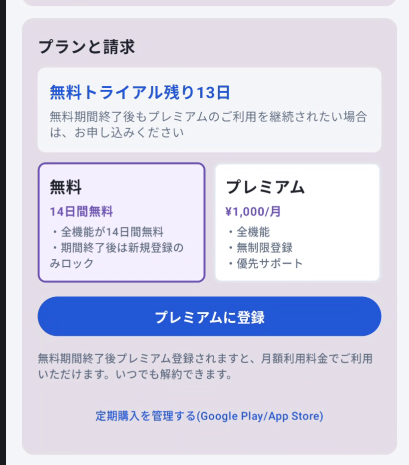
| Free trial | All the same features as a Premium member, free for 14 days after registering an account. |
| Premium | A monthly subscription that keeps all features available after the trial ends. |
Once the trial period ends, your account remains registered but functionality drops back to view-only, the same as a Guest. A Premium subscription is required to keep using the full feature set.
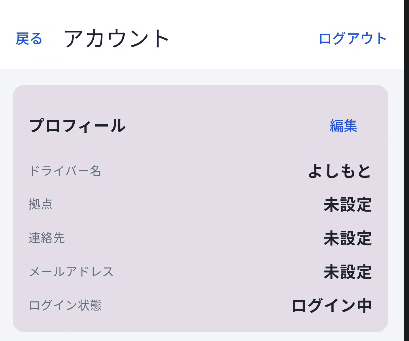
1Edit your profile
Open "Account" from the side menu to view and edit your driver name, base location, contact info, and email address.
2Subscribe to Premium
The "Plan & Billing" section of the Account screen shows your current plan and price. Tap "Subscribe to Premium" to sign up via the App Store. It's a monthly subscription you can cancel at any time.
3Restore purchases / manage subscription
If you've changed devices and need HAKOBUN to recognize your Premium membership again, tap "Restore purchases."
To cancel or change your payment method, use "Manage subscription," which opens the App Store's subscription settings.
4Cancel your account
Tapping "Cancel account" on the Account screen shows a confirmation dialog; confirming it deletes your in-app data.
Cancelling your account deletes data stored locally. Back up anything you need beforehand.