Updating Delivery Status & Voice Features
Once a delivery is done, update its status. You can do this by hand, or hands-free using just your voice.
1Change status from a pin on the map
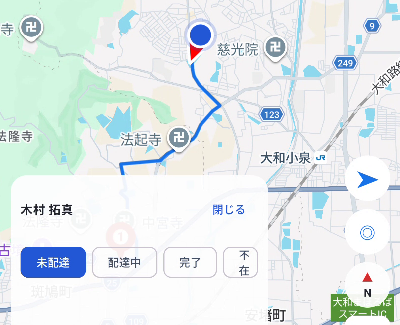
Tap a pin on the map to show a card with the recipient's name and status buttons (Not delivered / In progress / Completed / Absent / Redelivery / Returned, etc.). Tap the appropriate button to update the status instantly.
2Change status from the package list / edit screen
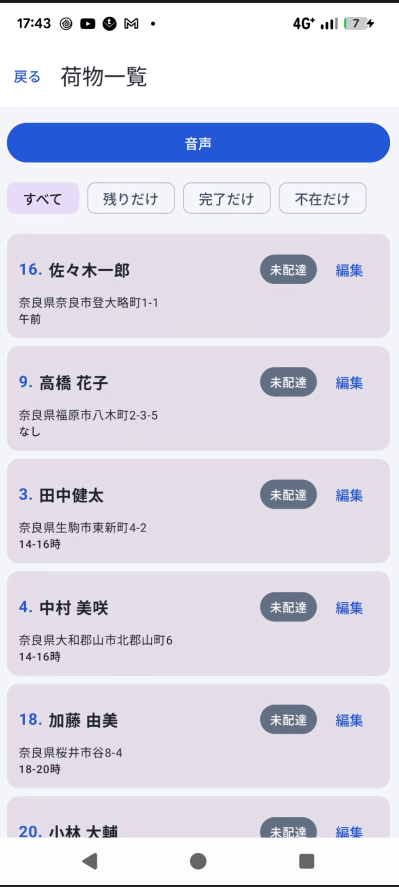
Selecting a package from "Package List" in the side menu opens its edit screen, where you can also change the status or correct the address, notes, and other details.
3Change status by voice
Tap the "Change status by voice" button at the top of the package edit screen and say something like "Completed," "Absent," "Redelivery," "Returned," "In progress," or "Not delivered" — the status switches automatically to match. On success, the app reads back a confirmation aloud.
Voice status-change button in use
4Hear your next delivery by voice
Tapping the "Voice" button on the Home screen or package list screen reads aloud the recipient name of your next delivery — handy when it's hard to look at the screen, such as while driving.